How it works
The bidirectional connection between the Socket.IO server and the Socket.IO client is established with either:
- a WebTransport bidirectional stream
- a WebSocket connection
- or HTTP long-polling, in the worst case
The Socket.IO codebase is split into two distinct layers:
- the low-level plumbing: what we call Engine.IO, the engine inside Socket.IO
- the high-level API: Socket.IO itself
Engine.IO
Engine.IO is responsible for establishing the low-level connection between the server and the client. It handles:
- the various transports and the upgrade mechanism
- the disconnection detection
A detailed version of the Engine.IO protocol can be found here.
The source code of the reference implementation (written in TypeScript) can be found in the Socket.IO monorepo:
| Component | Package | Link |
|---|---|---|
| Server | engine.io | https://github.com/socketio/socket.io/tree/main/packages/engine.io |
| Client | engine.io-client | https://github.com/socketio/socket.io/tree/main/packages/engine.io-client |
| Parser | engine.io-parser | https://github.com/socketio/socket.io/tree/main/packages/engine.io-parser |
Transports
There are currently three built-in transports:
HTTP long-polling
The HTTP long-polling transport (also simply referred as "polling") consists of successive HTTP requests:
- long-running
GETrequests, for receiving data from the server - short-running
POSTrequests, for sending data to the server
It is available on all platforms, but it is also the least performant transport since each packet needs a new HTTP request (with its headers).
| Metric | Value |
|---|---|
| Support | Best |
| Performance | Acceptable |
WebSocket
The WebSocket transport uses a WebSocket connection to send and receive data.
References:
- MDN: https://developer.mozilla.org/en-US/docs/Web/API/WebSockets_API
- Specification: https://datatracker.ietf.org/doc/html/rfc6455 (published in December 2011)
- Can I use: https://caniuse.com/mdn-api_websocket (
99.84%of all tracked, as of early 2026)
It is available on all platforms and has great performance (unlike HTTP long-polling, the HTTP headers are sent once at the beginning of the session), but might still be blocked by some proxies.
| Metric | Value |
|---|---|
| Support | Great |
| Performance | Great |
WebTransport
The WebTransport transport uses a WebTransport bidirectional stream to send and receive data.
References:
- MDN: https://developer.mozilla.org/en-US/docs/Web/API/WebTransport_API
- Specification (draft): https://datatracker.ietf.org/doc/html/draft-ietf-webtrans-http3/
- Can I use: https://caniuse.com/mdn-api_webtransport (
84.48%of all tracked, as of early 2026)
Its availability is limited (currently in technical preview on Safari), but it's also the most efficient transport, especially in environments prone to packet loss.
| Metric | Value |
|---|---|
| Support | In progress |
| Performance | Best |
Handshake
At the beginning of the Engine.IO connection, the server sends some information:
{
  "sid": "FSDjX-WRwSA4zTZMALqx",
  "upgrades": ["websocket"],
  "pingInterval": 25000,
  "pingTimeout": 20000,
  "maxPayload": 1000000
}
- the
sidis the ID of the session, it must be included in thesidquery parameter in all subsequent HTTP requests - the
upgradesarray contains the list of all "better" transports that are supported by the server - the
pingIntervalandpingTimeoutvalues are used in the heartbeat mechanism - the
maxPayloadvalue indicates the max number of bytes per packet accepted by the server
Upgrade mechanism
By default, the client establishes the connection with the HTTP long-polling transport.
But, why?
While WebSocket is clearly the best way to establish a bidirectional communication, experience has shown that it is not always possible to establish a WebSocket connection, due to corporate proxies, personal firewall, antivirus software...
From the user perspective, an unsuccessful WebSocket connection can translate in up to 10 seconds of waiting for the realtime application to begin exchanging data. This perceptively hurts user experience.
To summarize, Engine.IO focuses on reliability and user experience first, marginal potential UX improvements and increased server performance second.
To upgrade, the client will:
- ensure its outgoing buffer is empty
- put the current transport in read-only mode
- try to establish a connection with the other transport
- if successful, close the first transport
You can check in the Network Monitor of your browser:
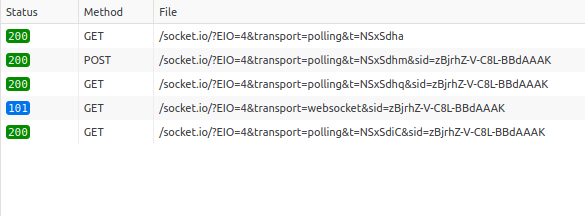
- handshake (contains the session ID — here,
zBjrh...AAAK— that is used in subsequent requests) - send data (HTTP long-polling)
- receive data (HTTP long-polling)
- upgrade (WebSocket)
- receive data (HTTP long-polling, closed once the WebSocket connection in 4. is successfully established)
Disconnection detection
The Engine.IO connection is considered as closed when:
- one HTTP request (either GET or POST) fails (for example, when the server is shutdown)
- the WebSocket connection is closed (for example, when the user closes the tab in its browser)
socket.disconnect()is called on the server-side or on the client-side
There is also a heartbeat mechanism which checks that the connection between the server and the client is still up and running:
At a given interval (the pingInterval value sent in the handshake) the server sends a PING packet and the client has a few seconds (the pingTimeout value) to send a PONG packet back. If the server does not receive a PONG packet back, it will consider that the connection is closed. Conversely, if the client does not receive a PING packet within pingInterval + pingTimeout, it will consider that the connection is closed.
The disconnection reasons are listed here (server-side) and here (client-side).
Socket.IO
Socket.IO provides some additional features over the Engine.IO connection:
- automatic reconnection
- packet buffering
- acknowledgments
- broadcasting to all clients or to a subset of clients (what we call "Room")
- connection state recovery, for temporary disconnections
- multiplexing (what we call "Namespace")
A detailed version of the Socket.IO protocol can be found here.
The source code of the reference implementation (written in TypeScript) can be found in the Socket.IO monorepo:
| Component | Package | Link |
|---|---|---|
| Server | socket.io | https://github.com/socketio/socket.io/tree/main/packages/socket.io |
| Client | socket.io-client | https://github.com/socketio/socket.io/tree/main/packages/socket.io-client |
| Parser | socket.io-parser | https://github.com/socketio/socket.io/tree/main/packages/socket.io-parser |