Namespaces
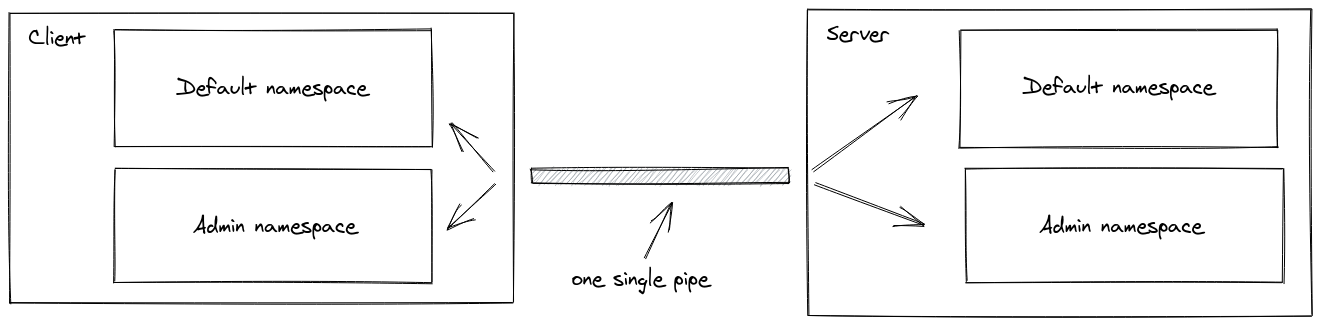
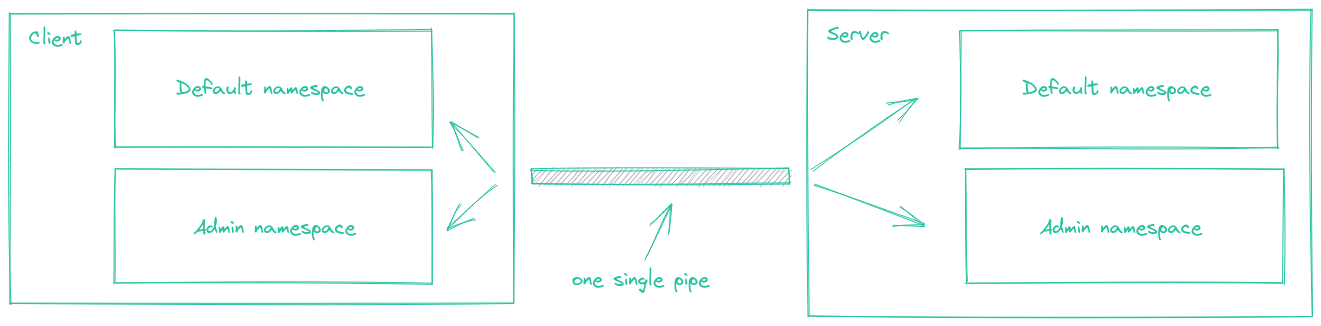
A Namespace is a communication channel that allows you to split the logic of your application over a single shared connection (also called "multiplexing").
Introduction
Each namespace has its own:
io.of("/orders").on("connection", (socket) => {
  socket.on("order:list", () => {});
  socket.on("order:create", () => {});
});

io.of("/users").on("connection", (socket) => {
  socket.on("user:list", () => {});
});
const orderNamespace = io.of("/orders");

orderNamespace.on("connection", (socket) => {
  socket.join("room1");
  orderNamespace.to("room1").emit("hello");
});

const userNamespace = io.of("/users");

userNamespace.on("connection", (socket) => {
  socket.join("room1"); // distinct from the room in the "orders" namespace
  userNamespace.to("room1").emit("hola");
});
const orderNamespace = io.of("/orders");

orderNamespace.use((socket, next) => {
  // ensure the socket has access to the "orders" namespace, and then
  next();
});

const userNamespace = io.of("/users");

userNamespace.use((socket, next) => {
  // ensure the socket has access to the "users" namespace, and then
  next();
});
Possible use cases:
- you want to create a special namespace that only authorized users have access to, so the logic related to those users is separated from the rest of the application
const adminNamespace = io.of("/admin");

adminNamespace.use((socket, next) => {
  // ensure the user has sufficient rights
  next();
});

adminNamespace.on("connection", (socket) => {
  socket.on("delete user", () => {
    // ...
  });
});
- your application has multiple tenants, so you want to dynamically create one namespace per tenant
const workspaces = io.of(/^\/\w+$/);

workspaces.on("connection", (socket) => {
  const workspace = socket.nsp;

  workspace.emit("hello");
});
Main namespace
Until now, you interacted with the main namespace, called /. The io instance inherits all of its methods:
io.on("connection", (socket) => {});
io.use((socket, next) => { next() });
io.emit("hello");
// are actually equivalent to
io.of("/").on("connection", (socket) => {});
io.of("/").use((socket, next) => { next() });
io.of("/").emit("hello");
Some tutorials may also mention io.sockets, it's simply an alias for io.of("/").
io.sockets === io.of("/")
Custom namespaces
To set up a custom namespace, you can call the of function on the server-side:
const nsp = io.of("/my-namespace");

nsp.on("connection", (socket) => {
  console.log("someone connected");
});

nsp.emit("hi", "everyone!");
Client initialization
Same-origin version:
const socket = io(); // or io("/"), the main namespace
const orderSocket = io("/orders"); // the "orders" namespace
const userSocket = io("/users"); // the "users" namespace
Cross-origin/Node.js version:
const socket = io("https://example.com"); // or io("https://example.com/"), the main namespace
const orderSocket = io("https://example.com/orders"); // the "orders" namespace
const userSocket = io("https://example.com/users"); // the "users" namespace
In the example above, only one low-level connection will be established, and the packets will automatically be routed to the right namespace.
Please note that multiplexing will be disabled in the following cases:
- multiple creations for the same namespace
const socket1 = io();
const socket2 = io(); // no multiplexing, two distinct WebSocket connections
- different domains
const socket1 = io("https://first.example.com");
const socket2 = io("https://second.example.com"); // no multiplexing, two distinct WebSocket connections
- usage of the forceNew option
const socket1 = io();
const socket2 = io("/admin", { forceNew: true }); // no multiplexing, two distinct WebSocket connections
Dynamic namespaces
Usage
It is also possible to dynamically create namespaces, either with a regular expression:
io.of(/^\/dynamic-\d+$/);
or with a function:
io.of((name, auth, next) => {
  // name is the requested namespace, for example "/workspace-123"
  // auth is the authentication payload sent by the client
  next(null, true); // or false, when the creation is denied
});
You can access the newly created namespace in the connection event:
io.of(/^\/dynamic-\d+$/).on("connection", (socket) => {
  const namespace = socket.nsp;
});
Priority
Existing namespaces have priority over dynamic namespaces. For example:
// register "dynamic-101" namespace
io.of("/dynamic-101");

io.of(/^\/dynamic-\d+$/).on("connection", (socket) => {
  // will not be called for a connection on the "dynamic-101" namespace
});
Security considerations
Prefer function-based dynamic namespaces when namespace creation depends on user identity, permissions, or tenant membership.
For example, this pattern:
io.of(/^\/\w+$/);
allows any client to create a new namespace by connecting to a matching name. Depending on your application, this could lead to unexpected namespace creation or resource usage.
You can use a function-based dynamic namespace to explicitly authorize or deny the creation:
io.of((name, auth, next) => {
  // validate both the namespace name and the auth payload
  next(null, true); // or false, when the creation is denied
});
Parent namespace
The return value of the of() method is what we call the parent namespace, from which you can:
- register middlewares
const parentNamespace = io.of(/^\/dynamic-\d+$/);

parentNamespace.use((socket, next) => {
  next();
});
The middleware will automatically be registered on each child namespace.
- broadcast events
const parentNamespace = io.of(/^\/dynamic-\d+$/);

parentNamespace.emit("hello"); // will be sent to users in /dynamic-1, /dynamic-2, ...
Cleanup of empty child namespaces
By default, dynamically created child namespaces are kept in memory even after the last socket disconnects.
You can enable automatic cleanup with the cleanupEmptyChildNamespaces option (available since v4.6.0):
const io = new Server(httpServer, {
  cleanupEmptyChildNamespaces: true,
});
With this option enabled, a child namespace created from a dynamic namespace is removed once it has no connected sockets anymore.
Complete API
The complete API exposed by the Namespace instance can be found here.